Unreal Horde
Unreal Engine Horde is a set of services supporting workflows Epic uses to develop Fortnite, Unreal Engine, and other titles. This module deploys the Unreal Engine Horde server on AWS Elastic Container Service using the image available from the Epic Games Github organization (requires Epic Games organization membership). Unreal Engine Horde relies on a Redis cache and a MongoDB compatible database. This module provides these services by provisioning an Amazon Elasticache with Redis OSS Compatibility cluster and an Amazon DocumentDB cluster.
Check out this video from Unreal Fest 2024 to learn more about the Unreal Horde module:

Deployment Architecture
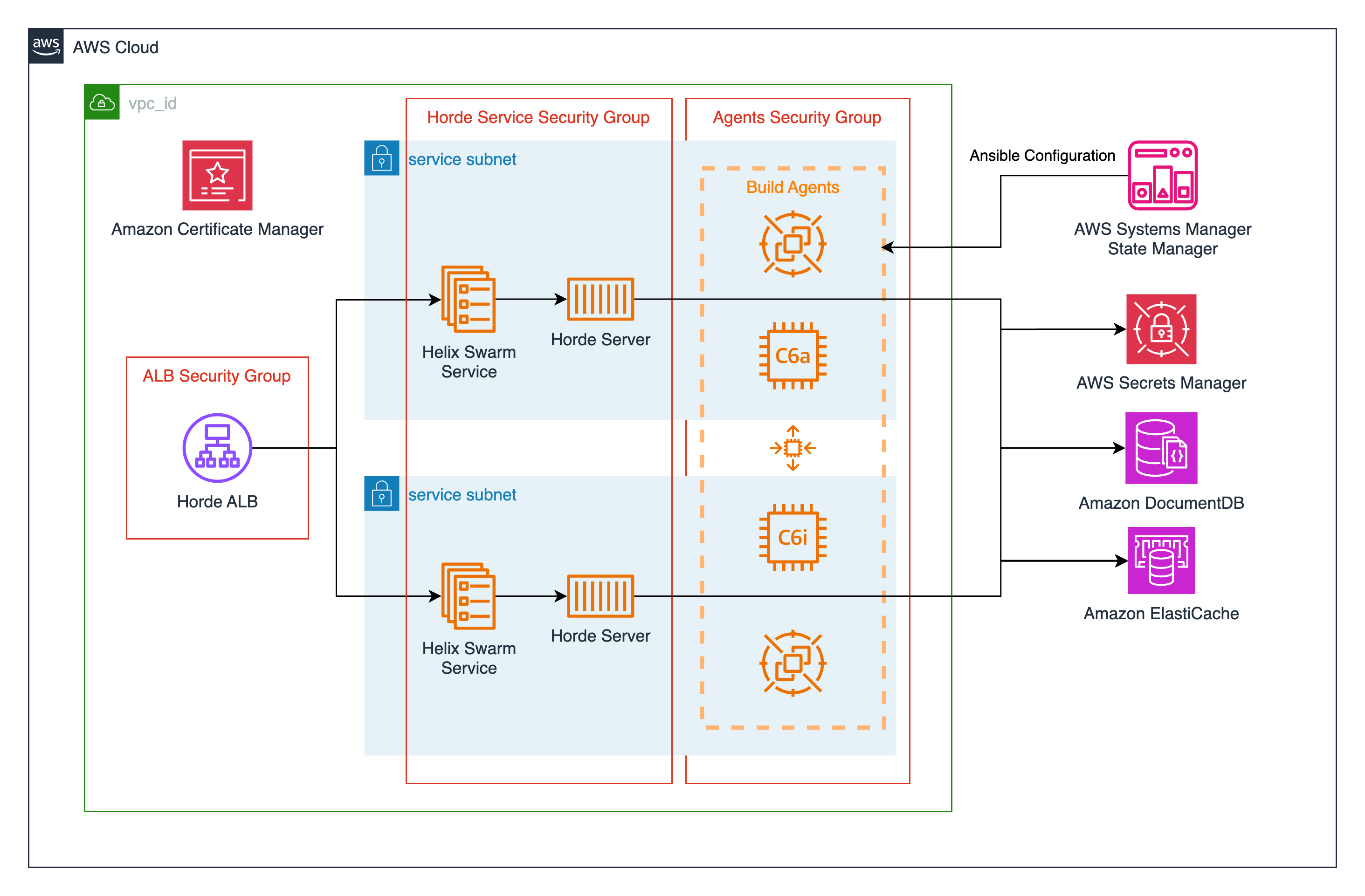
Prerequisites
Unreal Engine Horde is only available through the Epic Games Github organization's package registry or the Unreal Engine source code. In order to get access to this software you will need to join the Epic Games organization on Github and accept the Unreal Engine EULA.
Examples
For example configurations, please see the examples.
Horde Server Source Build Deployment Guide
This guide documents how to build Horde Server from source and use the build as part of your Horde deployment with the Cloud Game Development Toolkit.
Prerequisites
- Docker: Docker Desktop installed and running
- Git: For cloning repositories
- .NET SDK: .NET 8.0 or later
Fork and clone the Unreal Engine Github repository
You can follow the steps documented in the Unreal Engine Source Code. Be sure to run both Setup and GenerateProjectFiles scripts before proceeding.
Authenticate to your ECR registry
In a terminal window, run the following command to authenticate to your ECR registry:
aws ecr get-login-password --region <region> | docker login --username AWS --password-stdin <account-id>.dkr.ecr.<region.>.amazonaws.com
Create a repsoitory in Amazon ECR for storing your Horde Server container image:
In a terminal window, run the following command:
aws ecr create-repository --repository-name horde-server --image-scanning-configuration scanOnPush=true
Build Horde Server container image from source and publish to Amazon ECR
For devices using ARM64 architecture
- In an IDE, open the Horde Server Dockerfile located at
/Engine/Source/Programs/Horde/HordeServer/Dockerfile. -
Replace the code between
COPY --from=redis /usr/local/bin/redis-server /usr/local/bin/redis-serverandCOPY Source/Programs/Shared/EpicGames.Core/*.csproj ./Source/Programs/Shared/EpicGames.Core/with the following:3. Locate the code block with the comment# Since the .deb does not install in this image, just download it and extract the static binary RUN ARCH=$(dpkg --print-architecture) && \ if [ "$ARCH" = "arm64" ]; then \ wget https://repo.mongodb.org/apt/ubuntu/dists/jammy/mongodb-org/7.0/multiverse/binary-arm64/mongodb-org-server_7.0.4_arm64.deb && \ dpkg -x mongodb-org-server_7.0.4_arm64.deb /tmp/mongodb; \ elif [ "$ARCH" = "i386" ]; then \ wget https://repo.mongodb.org/apt/debian/dists/bookworm/mongodb-org/7.0/main/binary-i386/mongodb-org-server_7.0.4_i386.deb && \ dpkg -x mongodb-org-server_7.0.4_i386.deb /tmp/mongodb; \ else \ wget https://repo.mongodb.org/apt/debian/dists/bookworm/mongodb-org/7.0/main/binary-amd64/mongodb-org-server_7.0.4_amd64.deb && \ dpkg -x mongodb-org-server_7.0.4_amd64.deb /tmp/mongodb; \ fi && \ cp /tmp/mongodb/usr/bin/mongod /usr/local/bin/mongod# Remove native libs not used on Linux x86_64. We need to modify this so that the build has the libraries associated with the operating system and CPU architecture we are using. To do this, replace that block with the following:# Remove native libs not used for current architecture RUN ARCH=$(dpkg --print-architecture) && \ if [ "$ARCH" = "amd64" ]; then \ rm -rf /app/out/runtimes/osx* && \ rm -rf /app/out/runtimes/win-x86 && \ rm -rf /app/out/runtimes/win-arm* && \ rm -rf /app/out/runtimes/linux-arm* && \ rm -rf /app/out/runtimes/linux-x86 && \ rm -rf /app/out/runtimes/linux/native/libgrpc_csharp_ext.x86.so; \ elif [ "$ARCH" = "arm64" ]; then \ rm -rf /app/out/runtimes/osx-x64 && \ rm -rf /app/out/runtimes/win-x64 && \ rm -rf /app/out/runtimes/win-x86 && \ rm -rf /app/out/runtimes/linux-x64* && \ rm -rf /app/out/runtimes/linux-x86 && \ rm -rf /app/out/runtimes/linux/native/libgrpc_csharp_ext.x64.so && \ rm -rf /app/out/runtimes/linux/native/libgrpc_csharp_ext.x86.so; \ elif [ "$ARCH" = "i386" ]; then \ rm -rf /app/out/runtimes/osx* && \ rm -rf /app/out/runtimes/win-x64 && \ rm -rf /app/out/runtimes/win-arm* && \ rm -rf /app/out/runtimes/linux-x64* && \ rm -rf /app/out/runtimes/linux-arm* && \ rm -rf /app/out/runtimes/linux/native/libgrpc_csharp_ext.x64.so; \ fiUpdate server.json (Optional)
Update the Horde BuildGraph
- In an IDE, open the file
Engine/Source/Programs/Horde/BuildHorde.xml. -
Create a new build target to build the Hord Server with the Dashboard and push the image to your Amazon ECR repository. Be sure to replace the values for
<account-id>and<region>with your own values.<Node Name="Build and Publish HordeServer to ECR" Requires="Build HordeServer;Build HordeDashboard"> <!-- Create a new image by combining server and dashboard image into one --> <Docker-Build BaseDir="Engine/Source/Programs/Horde/HordeServer" Files="Dockerfile*" UseBuildKit="true" Tag="horde-server" DockerFile="Engine/Source/Programs/Horde/HordeServer/Dockerfile.dashboard" /> <!-- Publish the docker image to Amazon ECR --> <Docker-Push Repository="<account-id>.dkr.ecr.<region>.amazonaws.com" Image="horde-server" TargetImage="horde/horde-server:$(Version)" AwsEcr="True" /> </Node> -
In your terminal window, and navigate to
Engine/Build/BatchFiles.cd Engine/Build/BatchFiles -
Run the following command to build the Horde Server and Dashboard, then publish your docker image to Amazon ECR. ### Windows
RunUAT.bat BuildGraph -Script=Engine/Source/Programs/Horde/BuildHorde.xml -Target="Build and Publish HordeServer to ECR"Linux and Mac
./RunUAT.sh BuildGraph -Script=Engine/Source/Programs/Horde/BuildHorde.xml -Target="Build and Publish HordeServer to ECR" -
Note the URI of the image that was published to Amazon ECR. It should be in the format of
<account-id>.dkr.ecr.<region>.amazonaws.com/horde/horde-server:<version> -
You can also locate the URI of the image in the AWS Console under Amazon ECR, or using the AWS CLI command:
aws ecr describe-images --repository-name horde-server
Update your Cloud Game Development Toolkit configuration
In order to use your newly created container image as your Horde Server image, you will need to specify the URI of the image as the value for the image variable. For this example we will be using the example deployment located at modules/unreal/horde/examples/complete
1. In your IDE, open the main.tf located at modules/unreal/horde/examples/complete/main.tf.
2. Under the module declaration "unreal_engine_horde" add the following line with the value of the image URI you noted earlier. Be sure to also set the value of is_source_build to true and set the value of horde_server_architecture to ARM64 or X_86 by passing the value with the var.horde_server_architecture variable as shown below:
module "unreal_engine_horde" {
    ...
    image = "<image-uri>"
    is_source_build = true
    horde_server_architecture = "<horde-server-architecture>"
    ...
}
modules/unreal/horde/examples/complete and run the following commands:
terraform init
terraform apply
Requirements
| Name | Version |
|---|---|
| terraform | >= 1.0 |
| aws | ~> 6.6 |
| random | ~> 3.7 |
Providers
| Name | Version |
|---|---|
| aws | ~> 6.6 |
| random | ~> 3.7 |
Modules
No modules.
Resources
Inputs
| Name | Description | Type | Default | Required |
|---|---|---|---|---|
| certificate_arn | The TLS certificate ARN for the Unreal Horde load balancer. | string |
n/a | yes |
| fully_qualified_domain_name | The fully qualified domain name where your Unreal Engine Horde server will be available. This agents will use this to enroll. | string |
n/a | yes |
| unreal_horde_service_subnets | A list of subnets to deploy the Unreal Horde service into. Private subnets are recommended. | list(string) |
n/a | yes |
| vpc_id | The ID of the existing VPC you would like to deploy Unreal Horde into. | string |
n/a | yes |
| admin_claim_type | The claim type for administrators. | string |
null |
no |
| admin_claim_value | The claim value for administrators. | string |
null |
no |
| agent_dotnet_runtime_version | The dotnet-runtime-{} package to install (see your engine version's release notes for supported version) | string |
"6.0" |
no |
| agents | Configures autoscaling groups to be used as build agents by Unreal Engine Horde. | map(object({ |
{} |
no |
| auth_method | The authentication method for the Horde server. | string |
null |
no |
| cluster_name | The name of the cluster to deploy the Unreal Horde into. Defaults to null and a cluster will be created. | string |
null |
no |
| container_api_port | The container port for the Unreal Horde web server. | number |
5000 |
no |
| container_cpu | The CPU allotment for the Unreal Horde container. | number |
1024 |
no |
| container_grpc_port | The container port for the Unreal Horde GRPC channel. | number |
5002 |
no |
| container_memory | The memory allotment for the Unreal Horde container. | number |
4096 |
no |
| container_name | The name of the Unreal Horde container. | string |
"unreal-horde-container" |
no |
| create_external_alb | Set this flag to true to create an external load balancer for Unreal Horde. | bool |
true |
no |
| create_internal_alb | Set this flag to true to create an internal load balancer for Unreal Horde. | bool |
true |
no |
| create_unreal_horde_default_policy | Optional creation of Unreal Horde default IAM Policy. Default is set to true. | bool |
true |
no |
| create_unreal_horde_default_role | Optional creation of Unreal Horde default IAM Role. Default is set to true. | bool |
true |
no |
| create_unreal_horde_recycle_policy | Optional creation of Unreal Horde IAM Policy allowing usage of the AwsReuse/AwsRecycle fleet manager. | bool |
false |
no |
| custom_cache_connection_config | The redis-compatible connection configuration that Horde should use. | string |
null |
no |
| custom_unreal_horde_role | ARN of the custom IAM Role you wish to use with Unreal Horde. | string |
null |
no |
| database_connection_string | The database connection string that Horde should use. | string |
null |
no |
| debug | Set this flag to enable ECS execute permissions on the Unreal Horde container and force new service deployments on Terraform apply. | bool |
false |
no |
| desired_container_count | The desired number of containers running Unreal Horde. | number |
1 |
no |
| docdb_backup_retention_period | Number of days to retain backups for DocumentDB cluster. | number |
7 |
no |
| docdb_instance_class | The instance class for the Horde DocumentDB cluster. | string |
"db.t4g.medium" |
no |
| docdb_instance_count | The number of instances to provision for the Horde DocumentDB cluster. | number |
2 |
no |
| docdb_master_password | Master password created for DocumentDB cluster. | string |
"mustbeeightchars" |
no |
| docdb_master_username | Master username created for DocumentDB cluster. | string |
"horde" |
no |
| docdb_preferred_backup_window | The preferred window for DocumentDB backups to be created. | string |
"07:00-09:00" |
no |
| docdb_skip_final_snapshot | Flag for whether a final snapshot should be created when the cluster is destroyed. | bool |
true |
no |
| docdb_storage_encrypted | Configure DocumentDB storage at rest. | bool |
true |
no |
| elasticache_cluster_count | Number of cache cluster to provision in the Elasticache cluster. | number |
2 |
no |
| elasticache_engine | The engine to use for ElastiCache (redis or valkey) | string |
"redis" |
no |
| elasticache_node_count | Number of cache nodes to provision in the Elasticache cluster. | number |
1 |
no |
| elasticache_node_type | The type of nodes provisioned in the Elasticache cluster. | string |
"cache.t4g.micro" |
no |
| elasticache_port | The port for the ElastiCache cluster. | number |
6379 |
no |
| elasticache_redis_engine_version | The version of the Redis engine to use. | string |
"7.0" |
no |
| elasticache_redis_parameter_group_name | The name of the Redis parameter group to use. | string |
"default.redis7" |
no |
| elasticache_snapshot_retention_limit | The number of Elasticache snapshots to retain. | number |
5 |
no |
| elasticache_valkey_engine_version | The version of the ElastiCache engine to use. | string |
"7.2" |
no |
| elasticache_valkey_parameter_group_name | The name of the Valkey parameter group to use. | string |
"default.valkey7" |
no |
| enable_new_agents_by_default | Set this flag to automatically enable new agents that enroll with the Horde Server. | bool |
false |
no |
| enable_unreal_horde_alb_access_logs | Enables access logging for the Unreal Horde ALB. Defaults to true. | bool |
true |
no |
| enable_unreal_horde_alb_deletion_protection | Enables deletion protection for the Unreal Horde ALB. Defaults to true. | bool |
false |
no |
| environment | The current environment (e.g. Development, Staging, Production, etc.). This will tag ressources and set ASPNETCORE_ENVIRONMENT variable. | string |
"Development" |
no |
| existing_security_groups | A list of existing security group IDs to attach to the Unreal Horde load balancer. | list(string) |
[] |
no |
| github_credentials_secret_arn | A secret containing the Github username and password with permissions to the EpicGames organization. | string |
null |
no |
| horde_server_architecture | The CPU architecture for Horde server container. Valid values: x86 or arm64 | string |
"X86_64" |
no |
| image | The Horde Server image to use in the ECS service. | string |
"ghcr.io/epicgames/horde-server:latest-bundled" |
no |
| is_source_build | Set this flag to true if you are using a custom built Horde Server image from source. | bool |
false |
no |
| name | The name attached to Unreal Engine Horde module resources. | string |
"unreal-horde" |
no |
| oidc_audience | The audience used for validating externally issued tokens. | string |
null |
no |
| oidc_authority | The authority for the OIDC authentication provider used. | string |
null |
no |
| oidc_client_id | The client ID used for authenticating with the OIDC provider. | string |
null |
no |
| oidc_client_secret | The client secret used for authenticating with the OIDC provider. | string |
null |
no |
| oidc_signin_redirect | The sign-in redirect URL for the OIDC provider. | string |
null |
no |
| operating_system | The operating system for the Horde server container. Valid values: linux or windows | string |
"WINDOWS_SERVER_2019_CORE" |
no |
| p4_port | The Perforce server to connect to. | string |
null |
no |
| p4_super_user_password_secret_arn | Optionally provide the ARN of an AWS Secret for the p4d super user password. | string |
null |
no |
| p4_super_user_username_secret_arn | Optionally provide the ARN of an AWS Secret for the p4d super user username. | string |
null |
no |
| project_prefix | The project prefix for this workload. This is appeneded to the beginning of most resource names. | string |
"cgd" |
no |
| tags | Tags to apply to resources. | map(any) |
{ |
no |
| unreal_horde_alb_access_logs_bucket | ID of the S3 bucket for Unreal Horde ALB access log storage. If access logging is enabled and this is null the module creates a bucket. | string |
null |
no |
| unreal_horde_alb_access_logs_prefix | Log prefix for Unreal Horde ALB access logs. If null the project prefix and module name are used. | string |
null |
no |
| unreal_horde_cloudwatch_log_retention_in_days | The log retention in days of the cloudwatch log group for Unreal Horde. | string |
365 |
no |
| unreal_horde_external_alb_subnets | A list of subnets to deploy the Unreal Horde load balancer into. Public subnets are recommended. | list(string) |
[] |
no |
| unreal_horde_internal_alb_subnets | A list of subnets to deploy the Unreal Horde internal load balancer into. Private subnets are recommended. | list(string) |
[] |
no |
Outputs
| Name | Description |
|---|---|
| agent_security_group_id | n/a |
| external_alb_dns_name | n/a |
| external_alb_sg_id | n/a |
| external_alb_zone_id | n/a |
| internal_alb_dns_name | n/a |
| internal_alb_sg_id | n/a |
| internal_alb_zone_id | n/a |
| service_security_group_id | n/a |